Software testing security testing is the practice of finding weaknesses in applications before attackers can exploit them. It helps teams protect data, preserve customer trust, and reduce the cost of fixing security issues late in development. For modern web, mobile, API, and cloud-connected products, security testing is not a final checkbox; it is an ongoing discipline that supports safer releases.
What is security testing in software testing?
Security testing in software testing evaluates whether an application can resist misuse, unauthorized access, data exposure, and logic abuse. Instead of asking only, "Does this feature work?" it asks, "Can this feature be safely used, and can it be abused?" For example, a checkout page may pass functional testing because it accepts payment details, but security testing checks whether payment data is transmitted securely, whether users can manipulate prices, and whether error messages reveal sensitive system details.
A practical example is a development team building a customer portal. Functional tests confirm that users can log in, reset passwords, and download invoices. Software application security testing goes further by checking for weak password reset flows, broken access control, exposed invoice IDs, and insecure session handling. That difference matters because many real risks appear in the space between "the feature works" and "the feature is safe."
Types
Software security testing uses different methods because no single test can find every weakness. Some techniques inspect source code before the application runs, while others test the application from the outside while it is operating. The strongest programs combine automated coverage with human judgment, especially for business logic and high-risk workflows.
Static application security testing
Static application security testing reviews source code, bytecode, or binaries without executing the application. It is useful early in development because it can identify insecure coding patterns before a feature reaches a test environment. For example, a static analysis tool category may flag hardcoded secrets, unsafe cryptographic use, insecure input handling, or risky dependency calls inside a new authentication service.
SAST is especially helpful for shift-left teams because developers can receive feedback close to the moment they write code. The drawback is that static findings can include false positives, so teams need rules, triage, and developer education to avoid alert fatigue. A practical workflow is to block only critical, high-confidence findings in the build while sending lower-risk items into a backlog for review.
Dynamic application security testing
Dynamic application security testing examines a running application from the outside, much like an attacker would interact with it. It sends requests, observes responses, and looks for vulnerabilities such as injection flaws, weak headers, authentication gaps, insecure redirects, and exposed error behavior. This makes DAST valuable for testing web applications and APIs in realistic environments.
For example, a team releasing a new booking platform might run dynamic application security testing against a staging version of the site. The test may discover that a search field accepts unexpected input that causes database errors to appear in the browser. Even if the source code looked clean, the running system reveals how components behave together under pressure.
Interactive application security testing
Interactive application security testing combines aspects of static and dynamic analysis by observing an application while tests run. It can provide more context than a purely external scan because it sees runtime behavior inside the application. For example, during automated integration tests, an IAST capability might identify that untrusted input reaches a sensitive database query without proper validation.
IAST can help teams connect a vulnerability to the exact code path that caused it, which speeds remediation. However, it still depends on test coverage. If the automated tests never exercise a risky workflow, the interactive test may not see the issue, so teams should pair it with thoughtful test design.
Manual penetration testing and targeted reviews
Automated application security testing software is fast, repeatable, and useful for continuous coverage, but it cannot fully understand business intent. Manual penetration testing and expert review help uncover issues that tools often miss, such as abusing a coupon system, bypassing approval steps, or chaining several low-severity flaws into a serious risk.
Consider a finance app where users can transfer funds only after approval. A scanner may verify the presence of authentication, but a manual tester may discover that changing a request parameter allows one user to approve their own transaction. That type of logic flaw requires curiosity, context, and adversarial thinking.
Best Practices
Effective testing software security starts with risk awareness. Teams should identify what the application protects, who might attack it, and which features would cause the most harm if compromised. A public marketing form, an internal admin console, and a mobile app handling health or payment data do not carry the same level of risk, so they should not receive identical testing plans.
A practical security testing checklist includes:
- Define security requirements before coding begins, including authentication, authorization, logging, encryption, and data retention expectations.
- Test the highest-risk workflows first, such as login, payment, file upload, password reset, admin actions, and API access.
- Combine automated scans with manual review so speed does not replace judgment.
- Tune tools to reduce repeated false positives and focus developer attention on exploitable findings.
- Prioritize vulnerabilities by severity, exploitability, business impact, and exposure.
- Retest after fixes to confirm the issue is resolved and no related behavior was broken.
- Track recurring vulnerability patterns and address their root causes through training or reusable secure components.
For example, if a team repeatedly finds access control issues in API endpoints, the fix should not be limited to one endpoint. The better response is to review the authorization pattern, create shared middleware or guardrails, add automated tests for role-based access, and update code review guidance.
Another best practice is to make results usable. A report that lists hundreds of findings without context may technically be complete but practically ineffective. Developers need clear reproduction steps, affected endpoints or code paths, risk explanations, and remediation guidance. Security teams should avoid "throwing findings over the wall" and instead work with engineering to create fixes that fit the application architecture.
SDLC Integration
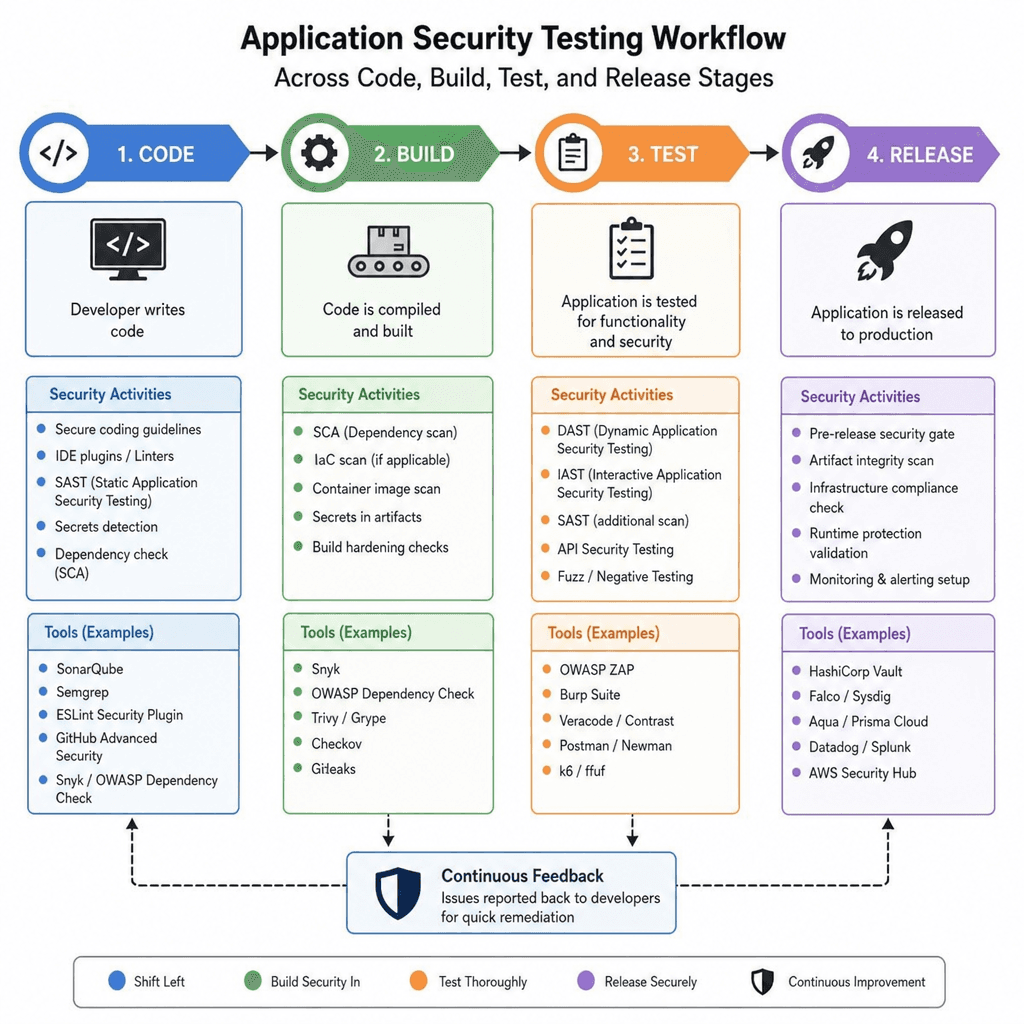
Security testing works best when it is embedded throughout the software development lifecycle, not saved for the week before release. The earlier a vulnerability is found, the easier it usually is to fix because the design is still flexible and the code is still fresh in the developer's mind. This is the idea behind shift-left security: move meaningful security feedback closer to planning, coding, and build stages.
How should teams integrate software application security testing into the SDLC?
Teams should integrate software application security testing by matching the right test to each development stage. During planning, define abuse cases and security requirements. During coding, use secure code review and static analysis. During build and test, run dependency checks, dynamic scans, API tests, and interactive analysis where appropriate. Before release, perform targeted manual testing on high-risk workflows, then continue monitoring and retesting after deployment.
A practical SDLC integration model might look like this:
- Planning: Product, engineering, and security identify sensitive data, user roles, compliance needs, and likely abuse scenarios.
- Design: Architects choose secure patterns for authentication, authorization, secrets management, logging, and data protection.
- Development: Developers use secure coding standards and receive fast feedback from static checks and peer review.
- Continuous integration: Automated scans run on code changes, dependencies, containers, and configuration where relevant.
- Staging: Dynamic testing validates the running application, including web routes, APIs, authentication flows, and error handling.
- Pre-release: Manual testing focuses on business logic, privilege escalation, data exposure, and chained attack paths.
- Production: Teams monitor security events, review new vulnerabilities in third-party components, and retest critical fixes.
For example, a team building a subscription platform can define abuse cases during design: users should not access unpaid features, change another customer's plan, or replay old payment requests. Those abuse cases become automated tests, code review prompts, and manual test scenarios. Security becomes part of delivery rather than an emergency at the end.
The main challenge is avoiding friction. If every minor finding blocks every release, developers may see security as an obstacle. A better approach is to set clear gates for critical risks, allow managed exceptions for lower-risk issues, and maintain a visible backlog with ownership and deadlines.
Mobile App Challenges and Tools
Mobile application security testing has unique challenges because mobile apps operate on devices that may be lost, shared, rooted, jailbroken, or connected to unsafe networks. Unlike a traditional web app, part of the application lives directly in the user's hands. That means testers must consider local data storage, platform permissions, offline behavior, insecure communication, reverse engineering, and interactions with backend APIs.
What makes mobile application security testing different?
Mobile application security testing is different because it must evaluate both the app and the environment around it. Testers examine how the app stores tokens, handles biometric prompts, validates certificates, communicates with APIs, protects sensitive screens, and behaves when the network is unreliable. For example, a healthcare scheduling app may hide data in the interface but still store appointment details unencrypted on the device, creating a privacy risk if the phone is compromised.
Useful categories of mobile and application security testing software include:
- Static mobile analysis: Reviews packaged app files and code patterns for hardcoded secrets, insecure storage, weak cryptography, and risky permissions.
- Dynamic mobile analysis: Runs the app in a controlled environment to inspect traffic, session behavior, local storage, and runtime decisions.
- API security testing: Checks whether mobile backend endpoints enforce authentication, authorization, input validation, rate limits, and safe error handling.
- Dependency and component analysis: Identifies vulnerable third-party libraries or outdated components included in the app.
- Configuration review: Examines platform settings, transport security, logging behavior, and build configuration.
- Manual mobile testing: Explores business logic, account switching, offline actions, and attempts to bypass client-side controls.
A practical example is a retail mobile app that lets users apply discounts and manage saved addresses. Testing should not only check whether the app encrypts traffic. It should also verify that discount rules are enforced on the server, saved addresses cannot be accessed by changing an account ID, and cached data disappears after logout when appropriate.
API testing deserves special attention because mobile apps often depend on backend services. If the mobile interface hides an admin action, that does not mean the API is protected. Testers should send direct API requests to confirm that the server, not just the mobile client, enforces access control.
Conclusion with Future Trends
Software testing security testing protects applications by finding weaknesses before they become incidents. The most effective programs combine SAST, dynamic application security testing, IAST, API checks, mobile-focused testing, dependency review, and manual penetration testing based on risk. The goal is not to run every possible test all the time; it is to create layered coverage that gives teams timely, useful evidence.
Future-ready security programs will likely become more continuous, more automated, and more integrated with development workflows. Teams will increasingly need better prioritization, clearer ownership, and broader visibility across applications, APIs, cloud services, mobile clients, and software supply chains. As systems grow more connected, testing software security will depend less on isolated scans and more on coordinated insight across the full application environment.
The practical takeaway is simple: start early, test often, and use the right method for the risk in front of you. A login flow, a payment API, and a mobile data cache each need different attention. When security testing becomes part of how software is designed, built, and improved, applications become safer without slowing teams to a crawl.